PIN and PUK
When you turn on the device, each phone asks for a PIN code corresponding to the SIM card that has been inserted into the device (if there are 2 SIM cards, then there are two PIN codes). Often, this PIN code is provided by your operator, but the operator may sometimes set a standard PIN code of 0000 or 1111. It is up to you to change it, and if you leave your device on without stopping, you may forget the one you chose. After 3 unsuccessful attempts, your SIM card is locked and asks for the PUK code. It is entirely possible in this case to remove the SIM card and access the content of your device, but you can no longer use your plan: no more calls, no more SMS, and no more Internet! This famous PUK code is on the plastic card where the SIM card was located. Did you throw it away or lose it? Don’t panic, just contact your customer service by phone or go to your online customer area… Be careful, some operators charge for this service!
Here are the sites to visit to obtain the PUK code for your SIM Card:
- Orange
- SFR
- Bouygues
- Free
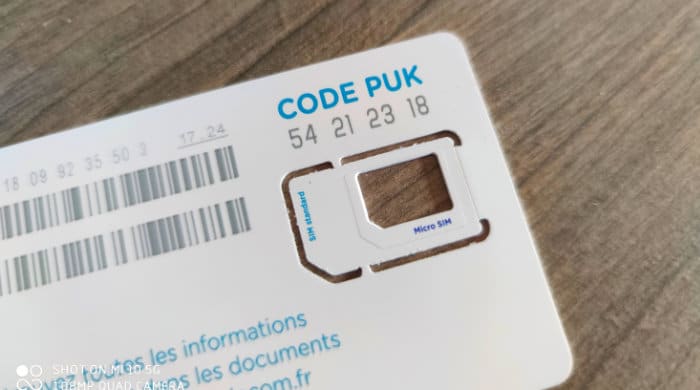
Even if you lose this small card, there are still a few solutions… Code, pattern, or incorrect fingerprint
The code, pattern, facial recognition, or fingerprint does not lock/unlock access to the GSM network, but to the content of the phone. The problem is that even if you have the SIM code, you won’t even be able to call without your unlocking method. Remember that this is very important in case of loss or theft, as anyone can access your photos, emails, apps, and all your online accounts. Therefore, it is advisable to choose this access method, as it is as important as the PIN code. If you forget your code, pattern, or password, the troubles begin… Note that if your face or fingerprint is not recognized, you will be prompted to provide your code, pattern, or password. In any case, if you forgot it, you are in a tough spot…
There is a method using Android Debug Bridge (ADB), which will allow you to take control of your device, but the debugging mode must be enabled on the device, which is not the default. Unless you activated this upstream mode, there is no chance of regaining access to your device or its content since it is encrypted. The last solution is to perform a factory reset of the smartphone (hard reset). You will regain access to the phone, but the content will be deleted. Hence the value of using the handy backup offered by Google. With your Google account, you will find (almost) everything!
To use this hard reset, you need to turn off the device, then hold down the power button along with the volume button (or up depending on the models). When you see the logo of your phone brand, release everything. You will then arrive at a special menu. Navigate with the volume up and down buttons and go to Wipe data, Wipe cache partition, or something similar. If you don’t succeed, your device has a method: search Google by typing the exact name of your model. For example: “Honor 8X hard reset”.
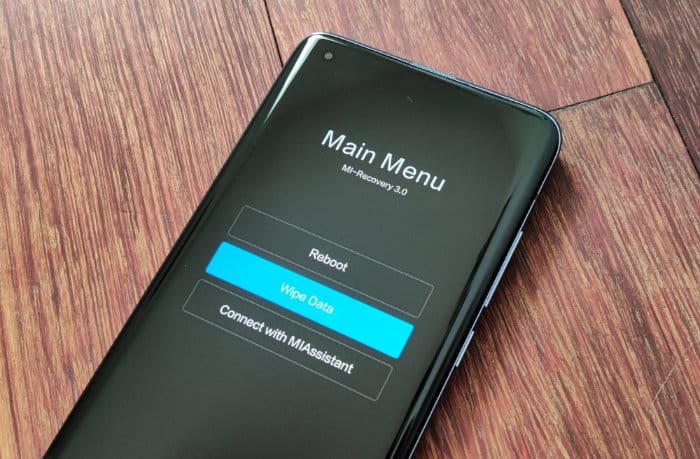
Even without being able to access your device’s menus, it is possible to take control… SimLocked
When we talk about unlocking your smartphone, we sometimes refer to being able to use a phone purchased with an Orange package, for example, to use it with SFR, for instance. For a few years now, an operator is no longer allowed to SimLock your device for more than 3 months. You are of course in debt for unpaid months (up to a certain limit, see our article on the Chatel law and how to benefit from it), but you can very well change operators. Just go to the operator’s website, enter your IMEI number (dial *#06# on your device) and retrieve a code that will allow you to “unlock” your device. You can then use it with whoever you want or even sell it.
Here are the sites to visit to be able to “unlock” your device:
- Orange
- SFR
- Bouygues
Be aware that before this 3-month limit, “unlocking” your smartphone is possible but illegal unless you pay a lump sum to your operator. Beware of people who will offer to do it for a sum of money, even a modest one. Have you already changed operators? No problem, it is the latter who will have to take care of the unlocking.
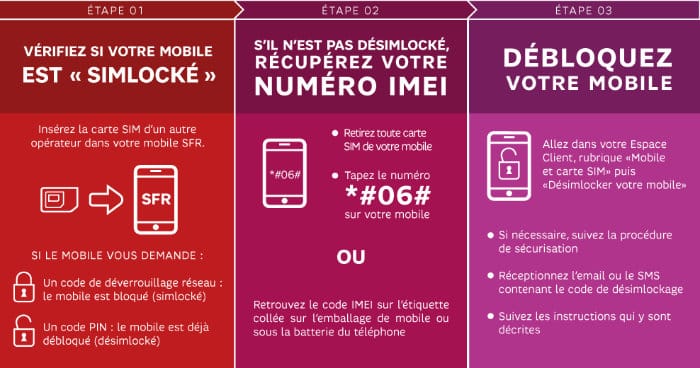 Most of the time, you just need to follow the instructions…
Tag : where is the PUK code